


Aller au contenu
View in the app

A better way to browse. Learn more.

Forum Bevolt

A full-screen app on your home screen with push notifications, badges and more.

To install this app on iOS and iPadOS
  1. Tap the Share icon in Safari
  2. Scroll the menu and tap Add to Home Screen.
  3. Tap Add in the top-right corner.
To install this app on Android
  1. Tap the 3-dot menu (⋮) in the top-right corner of the browser.
  2. Tap Add to Home screen or Install app.
  3. Confirm by tapping Install.

Présentation de Yves S

Featured Replies

Posté(é)

Bonjour,

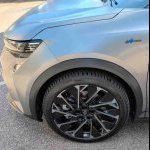
Yves 74 ans . Passionné de mécanique et de sports mécaniques depuis déjà plus de 50 ans. Je viens d'acquérir ma première voiture électrique une MG4 Urban Comfort 54 kwh commandée en Avril

Modifié par Yves S
Précisions

Posté(é)
  • Auteur

Bonjour,

Oui je recharge à domicile via une prise renforcée.

Account

Navigation

Rechercher

Rechercher

Configure browser push notifications

Chrome (Android)
  1. Tap the lock icon next to the address bar.
  2. Tap Permissions → Notifications.
  3. Adjust your preference.
Chrome (Desktop)
  1. Click the padlock icon in the address bar.
  2. Select Site settings.
  3. Find Notifications and adjust your preference.